IAE Academy

GATE DA

SQL

SQL for GATE DA is mostly about predicting the exact result of a query on small tables. That means knowing the logical order in which clauses are evaluated, how grouping and aggregation behave, how each join type counts rows, how subquery operators work, and how NULL turns comparisons into UNKNOWN. Careful hand evaluation needs particular attention to NULL and to bag-versus-set counting.

4 previous-year questions · 4 solved · 7 practice questions

Conventions and the logical order of evaluation

Conventions used here. SQL keywords are written in capitals. SQL works on bags (multisets): duplicate rows stay unless DISTINCT or a set operator without ALL removes them. Relational algebra, where it appears, uses set semantics. NULL follows three-valued logic (TRUE, FALSE, UNKNOWN). Unless a question says otherwise, assume a standard SQL engine in which these rules hold.

A query is read top to bottom but evaluated in a different order. Knowing the order explains why a WHERE clause cannot use an aggregate, why HAVING can, and why a SELECT alias is not visible in WHERE.

LOGICAL EVALUATION ORDER OF A QUERY BLOCK

Rows are filtered by WHERE before grouping; groups are filtered by HAVING after aggregation; ORDER BY runs last and does not change which rows are returned.

The basic block, with the one-clause-per-line layout used throughout:

WORKED EXAMPLE

Write a query that lists the distinct departments of employees earning more than 50000, in descending order of department name, for Emp(eid, dept, sal).

Solution
  1. FROM Emp supplies the rows.

  2. WHERE sal > 50000 keeps only the high earners. A row whose sal is NULL gives UNKNOWN and is dropped.

  3. SELECT DISTINCT dept removes duplicate department names.

  4. ORDER BY dept DESC sorts the final result.

Answer:

SELECT DISTINCT dept
FROM Emp
WHERE sal > 50000
ORDER BY dept DESC;

Rules to remember

  1. WHERE keeps a row only if the condition is TRUE; FALSE and UNKNOWN are both dropped.

  2. WHERE cannot contain an aggregate such as COUNT(*); that is the job of HAVING.

  3. ORDER BY may use a SELECT alias; WHERE may not.

  4. DISTINCT applies to the whole selected row, not to a single column.

  5. With UNION, INTERSECT or EXCEPT, each query block is evaluated in full first, the set operator then combines the results, and a final ORDER BY sorts the combined result.

  6. In ORDER BY, NULLs are grouped together (first or last depends on the system); do not rely on a particular position unless the question states it.

Predicates used in WHERE

  1. x BETWEEN a AND b means x >= a AND x <= b: both ends are included.

  2. LIKE patterns: % matches any sequence of characters, including the empty one; _ matches exactly one character. For example name LIKE 'A_%' matches names that start with A and have at least two characters.

  3. x IN (v1, v2, v3) means x = v1 OR x = v2 OR x = v3.

  4. x = NULL is never TRUE (it is UNKNOWN); test for a missing value with x IS NULL.

Set operations and bag semantics

UNION, INTERSECT and EXCEPT combine two queries with the same number of columns and compatible types. Without ALL they remove duplicates from the result (set behaviour). With ALL they follow bag counting. Rows are compared as whole tuples, and two NULLs are treated as equal here (not distinct) when comparing rows for these operators and for DISTINCT and GROUP BY.

BAG COUNTS FOR SET OPERATIONS

Here m and n are the number of copies of one particular tuple in the first and second operand. Without ALL, each of these results has at most one copy of every tuple.

Duplicates under each operator

Operator

Copies of a tuple in result

Duplicates removed?

UNION

1 if present in either operand

Yes

UNION ALL

m + n

No

INTERSECT

1 if present in both

Yes

INTERSECT ALL

min(m, n)

No

EXCEPT

1 if present in first and absent from second

Yes

EXCEPT ALL

max(m - n, 0)

No

EXAM TIP

Counting rows of UNION ALL is just addition. For UNION, count distinct tuples across both operands, which also removes duplicates that sit inside a single operand. A common slip is to count UNION as if it were UNION ALL.

Aggregates, GROUP BY and HAVING

The standard aggregates are COUNT, SUM, AVG, MIN and MAX. Every aggregate except COUNT(*) ignores NULL inputs. COUNT(*) counts rows; COUNT(col) counts rows where col is not NULL; COUNT(DISTINCT col) counts distinct non-NULL values. Likewise SUM(DISTINCT col) and AVG(DISTINCT col) work on the distinct non-NULL values.

AGGREGATES AND NULL

Both SUM and COUNT here skip NULLs, so AVG divides by the number of non-NULL values, not by the number of rows; when c has NULLs, AVG(c) differs from SUM(c)/COUNT(). If every value of c is NULL (or there are no rows), SUM, AVG, MIN and MAX return NULL and COUNT(c) returns 0, while COUNT() returns the number of rows (0 only when there are no rows).

GROUP BY partitions the rows (after WHERE) into groups with equal values of the grouping columns; all NULLs in a grouping column form one group. Each group yields at most one output row. Every column in SELECT must be either a grouping column or inside an aggregate (constants are also allowed). HAVING then filters whole groups, and may use aggregates.

Procedure to evaluate a grouped query by hand

  1. Apply FROM (and joins) to get the working rows.

  2. Apply WHERE: drop rows whose condition is not TRUE.

  3. Partition the survivors by the GROUP BY columns (one group for all NULLs).

  4. Compute the aggregates for each group, skipping NULL inputs.

  5. Apply HAVING: keep groups whose condition is TRUE.

  6. Project the SELECT list, apply DISTINCT, then ORDER BY.

With no GROUP BY, an aggregate query treats the whole table as a single group and returns exactly one row, even on an empty table (for example SELECT COUNT(*) FROM T returns 0 on an empty T). A HAVING without GROUP BY filters that single group, so the result has one row or none. With a GROUP BY on an empty table, the result is empty.

WORKED EXAMPLE

Table R(a, b) holds the rows (1, 10), (2, NULL), (3, 10), (4, 20), (5, NULL). Find the result of the query below.

SELECT b, COUNT(*), COUNT(b), SUM(a)
FROM R
GROUP BY b
HAVING COUNT(*) >= 2;
Solution
  1. Groups by b: {10: rows a=1,3}, {NULL: rows a=2,5}, {20: row a=4}. The two NULLs fall in one group.

  2. Group 10: COUNT(*) = 2, COUNT(b) = 2, SUM(a) = 1 + 3 = 4.

  3. Group NULL: COUNT(*) = 2, COUNT(b) = 0 because b is NULL in both rows, SUM(a) = 2 + 5 = 7.

  4. Group 20: COUNT(*) = 1, which fails HAVING COUNT(*) >= 2, so it is dropped.

Answer: Two rows: (10, 2, 2, 4) and (NULL, 2, 0, 7).

EXAM TIP

COUNT(*) versus COUNT(col) is the classic NULL trap. If a question prints both on the same group, the difference is the number of NULLs in col.

Joins

A join pairs rows from two tables on a condition. A cross join (FROM R, S or CROSS JOIN) gives every pairing, so rows. An inner join keeps only the pairs for which the ON condition is TRUE. A left outer join also keeps each unmatched row of the left table, padding the right-side columns with NULL; a right outer join does the same for the right table; a full outer join does both. A NATURAL JOIN joins on equality of all columns with the same name and keeps one copy of each such column; if the tables share no column name, it is a cross join. A NULL in a common column never matches.

ROW COUNT OF AN EQUI-JOIN ON ONE COLUMN

Here c_R(v) and c_S(v) are the numbers of rows of R and S with key value v. Sum over non-NULL values v only: a NULL key never satisfies equality, so it matches nothing.

ROW COUNTS OF OUTER JOINS

A row is unmatched if no row of the other table satisfies the ON condition; rows with a NULL join key are always unmatched. Every row of R appears at least once in R LEFT JOIN S, so the left join has at least |R| rows.

Join types at a glance

Join

Unmatched left rows

Unmatched right rows

INNER

dropped

dropped

LEFT OUTER

kept, right side NULL

dropped

RIGHT OUTER

dropped

kept, left side NULL

FULL OUTER

kept, right side NULL

kept, left side NULL

EXAM TIP

In an outer join, a condition in ON decides only matching: in a LEFT JOIN no ON condition can remove a left row, because a left row that matches nothing is still kept, padded with NULLs. A condition in WHERE filters the final rows. A WHERE condition on a right-table column that is not TRUE for NULL (for example S.b = 'x') removes every NULL-padded row and so turns the left join into an inner join. Self-joins need table aliases, for example FROM Emp E1 JOIN Emp E2 ON E1.mgr = E2.eid.

Nested and correlated subqueries

A subquery is a SELECT inside another query. A scalar subquery returns one value and can be used where a value is expected; if it returns no rows its value is NULL, and if it returns more than one row the query is an error. A subquery returning a column of values is used with IN, ANY, ALL; EXISTS only asks whether the subquery returns at least one row. A subquery is correlated if it refers to a column of the outer query; it is then logically re-evaluated for each outer row.

IN, ANY AND ALL

x op ANY S is TRUE if the comparison is TRUE for at least one value in S; x op ALL S is TRUE if it is TRUE for every value in S. On an empty S, ANY is FALSE and ALL is TRUE.

Subquery predicates (no NULLs involved)

Predicate

TRUE when

Empty subquery

EXISTS (Q)

Q returns at least one row

FALSE

NOT EXISTS (Q)

Q returns no rows

TRUE

x IN (Q)

some value of Q equals x

FALSE

x NOT IN (Q)

no value of Q equals x, and no comparison is UNKNOWN

TRUE

x > ALL (Q)

x is greater than every value of Q

TRUE

x > ANY (Q)

x is greater than at least one value of Q

FALSE

ANY and ALL when NULLs are present

  1. x op ANY (Q): TRUE if some comparison is TRUE; otherwise UNKNOWN if some comparison is UNKNOWN; otherwise FALSE.

  2. x op ALL (Q): FALSE if some comparison is FALSE; otherwise UNKNOWN if some comparison is UNKNOWN; otherwise TRUE.

  3. If x itself is NULL and Q is non-empty, x IN (Q) and x NOT IN (Q) are both UNKNOWN. On an empty Q, x NOT IN (Q) is TRUE even when x is NULL.

EXISTS and NOT EXISTS never return UNKNOWN: they look only at whether rows exist, and the columns listed in the subquery's SELECT are irrelevant. This makes NOT EXISTS safe when the subquery column can contain NULL, while NOT IN is not.

Procedure to evaluate a correlated subquery

  1. Take the first row of the outer table.

  2. Substitute its column values into the inner query.

  3. Evaluate the inner query to get its rows (or one value).

  4. Apply the EXISTS, IN, ANY, ALL or comparison to decide whether this outer row qualifies.

  5. Repeat for each outer row; the answer is the set of qualifying rows.

WORKED EXAMPLE

Emp(eid, dept, sal) holds (1, A, 30), (2, A, 50), (3, B, 40), (4, B, 40), (5, C, 20). What does the query return?

SELECT E.eid
FROM Emp E
WHERE E.sal >= ALL (
    SELECT F.sal
    FROM Emp F
    WHERE F.dept = E.dept
);
Solution
  1. For each employee, the inner query lists the salaries in the same department, including that employee's own.

  2. Department A has salaries {30, 50}: employee 1 (30) fails, employee 2 (50 >= 30 and 50 >= 50) passes.

  3. Department B has {40, 40}: both 3 and 4 satisfy 40 >= 40, so both pass. The >= lets ties through.

  4. Department C has {20}: employee 5 passes.

Answer: eid = 2, 3, 4, 5 (four rows): the employees whose salary is the highest in their department, with ties included.

Division ("for all") queries

A question of the form "find the students who are enrolled in every course" is relational division, in relational algebra (set semantics). SQL has no division operator. The standard way to write it is a double NOT EXISTS: keep a student for whom there is no course that the student is not enrolled in.

WORKED EXAMPLE

Course(cid) holds c1, c2. Enrolled(sid, cid) holds (s1, c1), (s1, c2), (s2, c1), (s3, c1), (s3, c2). What does the query return?

SELECT DISTINCT E.sid
FROM Enrolled E
WHERE NOT EXISTS (
    SELECT C.cid
    FROM Course C
    WHERE NOT EXISTS (
        SELECT *
        FROM Enrolled E2
        WHERE E2.sid = E.sid
        AND E2.cid = C.cid
    )
);
Solution
  1. For a fixed student, the middle query lists the courses that student is not enrolled in.

  2. s1: enrolled in c1 and c2, so the middle query is empty and NOT EXISTS is TRUE.

  3. s2: not enrolled in c2, so the middle query returns c2 and NOT EXISTS is FALSE.

  4. s3: enrolled in c1 and c2, so it qualifies. DISTINCT removes the repeats of s1 and s3.

Answer: s1 and s3.

A counting version is also common:

SELECT sid
FROM Enrolled
GROUP BY sid
HAVING COUNT(DISTINCT cid) = (SELECT COUNT(*) FROM Course);

It gives the same answer only when every Enrolled.cid is a course in Course (for example, when a foreign key enforces this) and cid is never NULL. The two versions also differ when Course is empty: the double NOT EXISTS then returns every student in Enrolled, while the counting version returns none.

Keys, constraints and referential actions

Constraint rules

  1. PRIMARY KEY: values must be unique and not NULL; a table has at most one primary key, which may span several columns.

  2. UNIQUE: no two rows may have equal non-NULL values. Standard SQL allows several rows with NULL there, because NULL = NULL is not TRUE. Some systems allow only one NULL, so follow the question if it says otherwise.

  3. FOREIGN KEY (c) REFERENCES T(k): every non-NULL value of c must appear in T.k, which must be declared PRIMARY KEY or UNIQUE. A NULL foreign key is allowed unless c is declared NOT NULL.

  4. When a referenced row is deleted (or its key updated): NO ACTION / RESTRICT, the default, rejects the change if referencing rows exist; ON DELETE CASCADE deletes the referencing rows too, and a cascade continues through further foreign keys; ON DELETE SET NULL sets the referencing column to NULL; ON DELETE SET DEFAULT sets it to the column's default.

  5. CHECK (condition) rejects a row only when the condition is FALSE; TRUE and UNKNOWN both pass.

WORKED EXAMPLE

Dept(did) is a primary key. Emp(eid, did) has did as a foreign key to Dept with ON DELETE CASCADE. Proj(pid, eid) has eid as a foreign key to Emp with ON DELETE SET NULL. The data are Dept: d1, d2; Emp: (e1, d1), (e2, d1), (e3, d2); Proj: (p1, e1), (p2, e3), (p3, e2). What do the tables hold after the statement below?

DELETE FROM Dept
WHERE did = 'd1';
Solution
  1. Dept loses d1, leaving d2.

  2. CASCADE deletes the employees of d1, which are e1 and e2. Emp now holds only (e3, d2).

  3. Deleting e1 and e2 triggers SET NULL on Proj: p1 and p3 get eid = NULL. p2 still references e3.

Answer: Dept: d2. Emp: (e3, d2). Proj: (p1, NULL), (p2, e3), (p3, NULL), so Proj still has 3 rows.

NULL semantics and three-valued logic

NULL means unknown or missing. Any comparison with NULL (=, <>, <, >, and so on, even NULL = NULL) evaluates to UNKNOWN. Arithmetic with NULL gives NULL. The only tests that give a definite answer are IS NULL and IS NOT NULL. Logical connectives follow three-valued logic.

Three-valued logic (T = TRUE, F = FALSE, U = UNKNOWN)

p

q

p AND q

p OR q

T

U

U

T

F

U

F

U

U

U

U

U

U

T

U

T

U

F

F

U

NEGATION IN THREE-VALUED LOGIC

Because NOT UNKNOWN is still UNKNOWN, a row failing both p and NOT p can exist: WHERE p OR NOT p does not return every row when p can be UNKNOWN.

Where NULL changes the result

  1. WHERE and HAVING keep only TRUE rows, so UNKNOWN rows vanish.

  2. If Q contains a NULL, x NOT IN (Q) is never TRUE: it is FALSE when x equals a non-NULL value of Q and UNKNOWN otherwise.

  3. COUNT(col), SUM, AVG, MIN, MAX skip NULLs; COUNT(*) does not.

  4. GROUP BY, DISTINCT, UNION, INTERSECT and EXCEPT treat NULLs as equal to one another.

  5. A join condition R.k = S.k never matches NULL keys, even NULL with NULL.

  6. A CHECK constraint passes when its condition is UNKNOWN, whereas WHERE rejects UNKNOWN.

WORKED EXAMPLE

S(x) holds 1, 2, 3 and T(y) holds 2, NULL. Compare the two queries.

SELECT x
FROM S
WHERE x NOT IN (SELECT y FROM T);
SELECT x
FROM S
WHERE NOT EXISTS (
    SELECT *
    FROM T
    WHERE T.y = S.x
);
Solution
  1. x NOT IN (2, NULL) means x <> 2 AND x <> NULL.

  2. x = 1: 1 <> 2 is TRUE, 1 <> NULL is UNKNOWN, so TRUE AND UNKNOWN = UNKNOWN: row dropped. x = 3 behaves the same. x = 2: 2 <> 2 is FALSE, so the row is dropped.

  3. So the first query returns no rows.

  4. In the second query the inner T.y = S.x is TRUE only for x = 2, and EXISTS is simply true or false. For x = 1 and x = 3 no row matches, so NOT EXISTS is TRUE.

Answer: The first query returns 0 rows; the second returns the rows 1 and 3.

EXAM TIP

When a question has NOT IN over a column that is not declared NOT NULL, check the data for a NULL first. One NULL in an uncorrelated NOT IN subquery makes that filter return no rows at all. NOT EXISTS is the NULL-safe way to write the same intent.

PREVIOUS-YEAR QUESTIONS

4 questions from the DA papers

Try each question first, then open the answer. We placed each question under a topic ourselves; the exam paper does not label topics.

See these papers in full: GATE DA 2026 · GATE DA 2025 · GATE DA 2024

GATE 2026 DA Q.51

GATE 2026 · DAQ.51 · 2 marks · MSQ

Consider a table Employee(EmpID, TeamID), where the column EmpID (ID of an employee) is the primary key. The column TeamID denotes the team ID of the team of which the employee is a member. TeamID is a NOT NULL column.

We want to display the size of the team (denoted as TeamSize) in which each employee is a member by using SQL. As an example, the desired output for the given Employee table is also shown in tabular form.

Which of the following is/are correct?

Employee table (EmpID, TeamID): (1, 8), (2, 8), (3, 8), (4, 7), (5, 7), (6, 9).
Output table (EmpID, TeamSize): (1, 3), (2, 3), (3, 3), (4, 2), (5, 2), (6, 1).
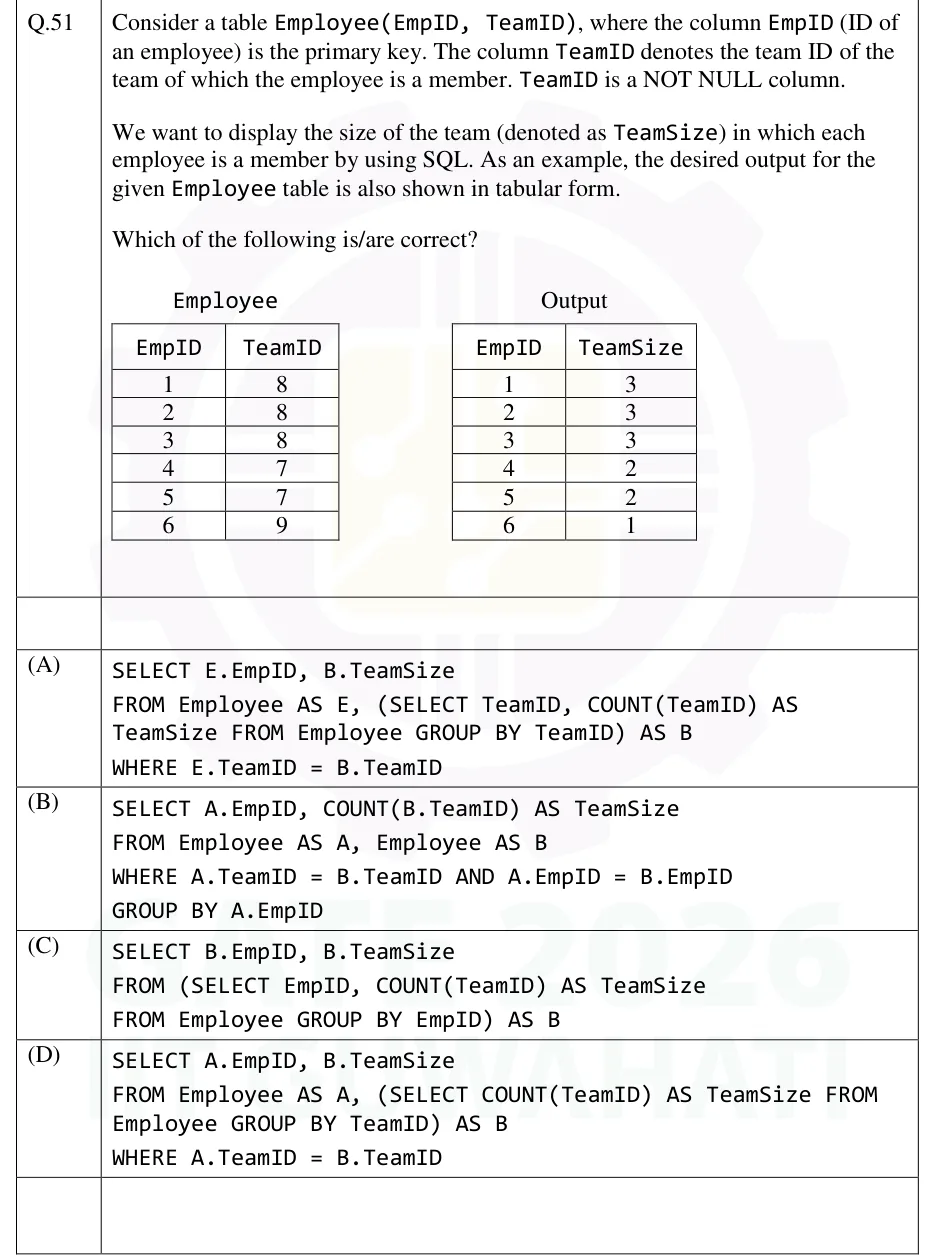
GATE 2026 DA question 51: Two tables side by side.Tap to open full size
Figure from the GATE 2026 DA paper. It is part of the question.
Figure description

Two tables side by side. Employee(EmpID, TeamID) has rows (1,8), (2,8), (3,8), (4,7), (5,7), (6,9). Output(EmpID, TeamSize) has rows (1,3), (2,3), (3,3), (4,2), (5,2), (6,1).

  1. (A)
    SELECT E.EmpID, B.TeamSize
    FROM Employee AS E, (SELECT TeamID, COUNT(TeamID) AS TeamSize FROM Employee GROUP BY TeamID) AS B
    WHERE E.TeamID = B.TeamID
  2. (B)
    SELECT A.EmpID, COUNT(B.TeamID) AS TeamSize
    FROM Employee AS A, Employee AS B
    WHERE A.TeamID = B.TeamID AND A.EmpID = B.EmpID
    GROUP BY A.EmpID
  3. (C)
    SELECT B.EmpID, B.TeamSize
    FROM (SELECT EmpID, COUNT(TeamID) AS TeamSize
    FROM Employee GROUP BY EmpID) AS B
  4. (D)
    SELECT A.EmpID, B.TeamSize
    FROM Employee AS A, (SELECT COUNT(TeamID) AS TeamSize FROM Employee GROUP BY TeamID) AS B
    WHERE A.TeamID = B.TeamID
Answer and solution
GATE 2026 DA Q.51: answer and solution

GATE 2026 DA Q.60

GATE 2026 · DAQ.60 · 2 marks · NAT

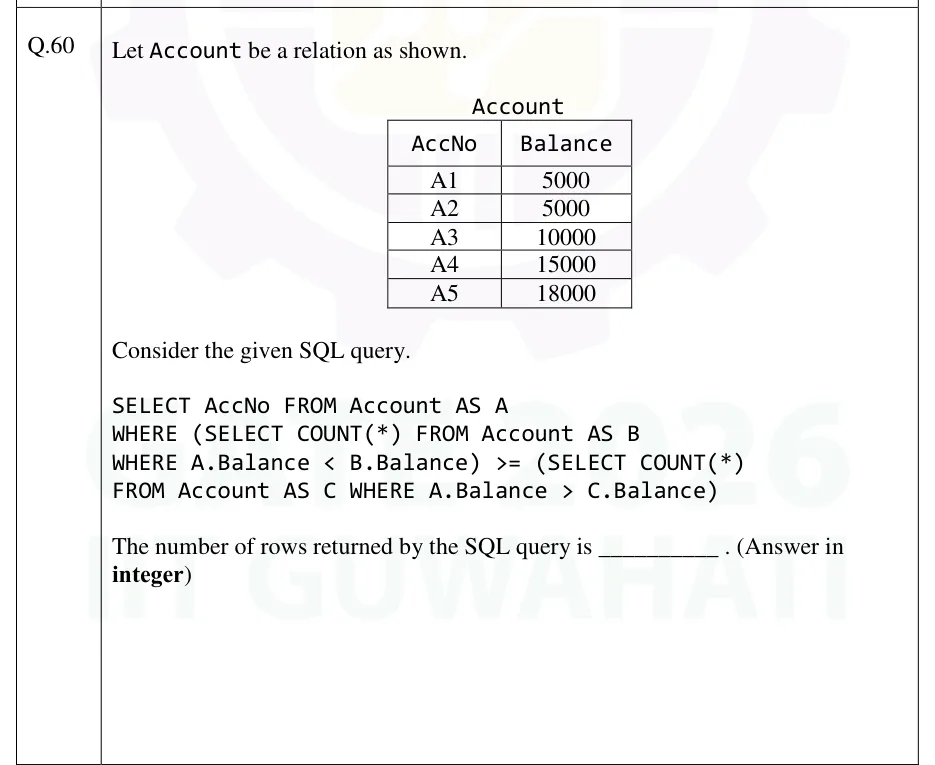
Let Account be a relation as shown.

| AccNo | Balance |
|---|---|
| A1 | 5000 |
| A2 | 5000 |
| A3 | 10000 |
| A4 | 15000 |
| A5 | 18000 |

Consider the given SQL query.

SELECT AccNo FROM Account AS A
WHERE (SELECT COUNT(*) FROM Account AS B
WHERE A.Balance < B.Balance) >= (SELECT COUNT(*)
FROM Account AS C WHERE A.Balance > C.Balance)

The number of rows returned by the SQL query is ______ . (Answer in integer)

GATE 2026 DA question 60: A table titled Account with columns AccNo and Balance and five rows: A1 5000, A2 5000, A3 10000, A4 15000, A5 18000.Tap to open full size
Figure from the GATE 2026 DA paper. It is part of the question.
Figure description

A table titled Account with columns AccNo and Balance and five rows: A1 5000, A2 5000, A3 10000, A4 15000, A5 18000.

Answer and solution
GATE 2026 DA Q.60: answer and solution

GATE 2025 DA Q.33

GATE 2025 · DAQ.33 · 1 mark · NAT

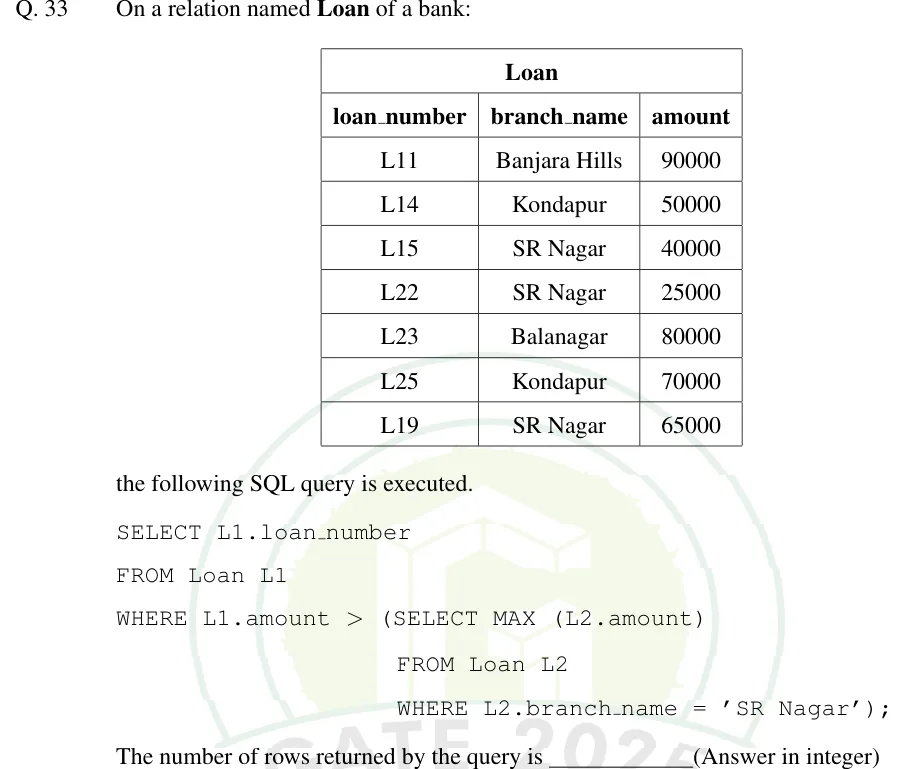
On a relation named Loan of a bank:

| loan_number | branch_name | amount |
|---|---|---|
| L11 | Banjara Hills | 90000 |
| L14 | Kondapur | 50000 |
| L15 | SR Nagar | 40000 |
| L22 | SR Nagar | 25000 |
| L23 | Balanagar | 80000 |
| L25 | Kondapur | 70000 |
| L19 | SR Nagar | 65000 |

the following SQL query is executed.

SELECT L1.loan_number
FROM Loan L1
WHERE L1.amount > (SELECT MAX (L2.amount)
                   FROM Loan L2
                   WHERE L2.branch_name = 'SR Nagar');

The number of rows returned by the query is ______ (Answer in integer)

GATE 2025 DA question 33: A table titled Loan with columns loan_number, branch_name, amount and seven rows: L11 Banjara Hills 90000;Tap to open full size
Figure from the GATE 2025 DA paper. It is part of the question.
Figure description

A table titled Loan with columns loan_number, branch_name, amount and seven rows: L11 Banjara Hills 90000; L14 Kondapur 50000; L15 SR Nagar 40000; L22 SR Nagar 25000; L23 Balanagar 80000; L25 Kondapur 70000; L19 SR Nagar 65000.

Answer and solution
GATE 2025 DA Q.33: answer and solution

GATE 2024 DA Q.31

GATE 2024 · DAQ.31 · 1 mark · NAT

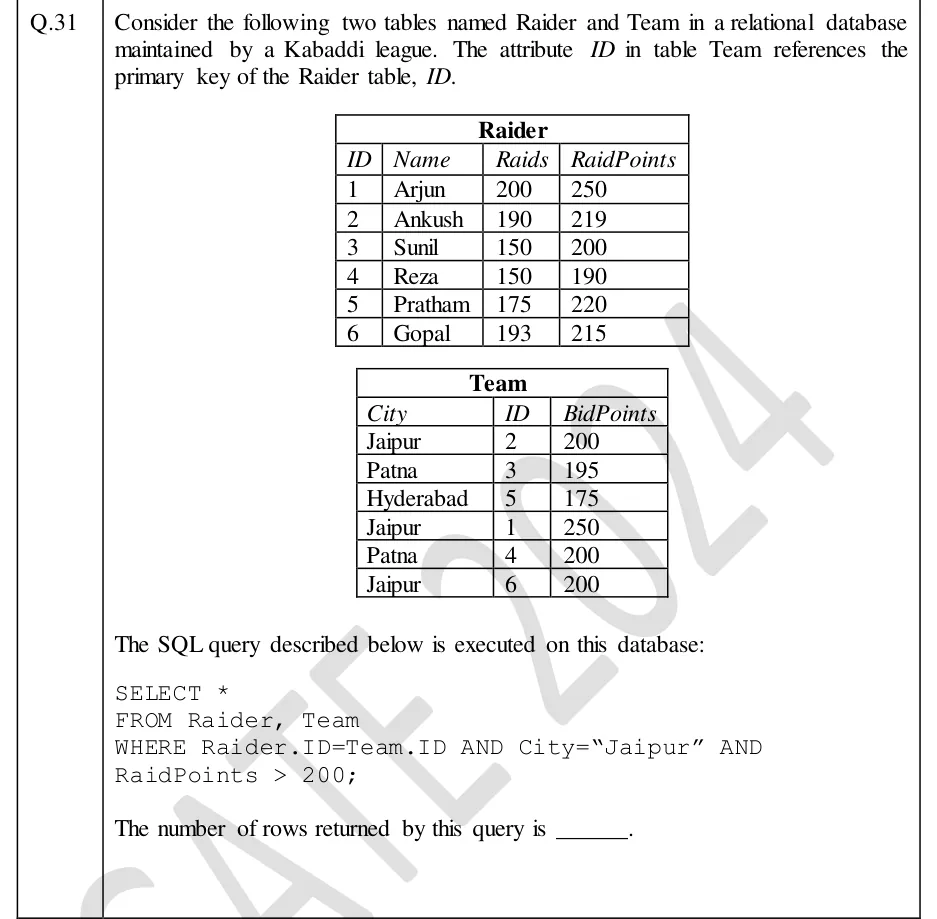
Consider the following two tables named Raider and Team in a relational database maintained by a Kabaddi league. The attribute ID in table Team references the primary key of the Raider table, ID.

The SQL query described below is executed on this database:

SELECT *
FROM Raider, Team
WHERE Raider.ID=Team.ID AND City="Jaipur" AND
RaidPoints > 200;

The number of rows returned by this query is ______.

GATE 2024 DA question 31: Two tables.Tap to open full size
Figure from the GATE 2024 DA paper. It is part of the question.
Figure description

Two tables. Raider(ID, Name, Raids, RaidPoints): (1, Arjun, 200, 250); (2, Ankush, 190, 219); (3, Sunil, 150, 200); (4, Reza, 150, 190); (5, Pratham, 175, 220); (6, Gopal, 193, 215). Team(City, ID, BidPoints): (Jaipur, 2, 200); (Patna, 3, 195); (Hyderabad, 5, 175); (Jaipur, 1, 250); (Patna, 4, 200); (Jaipur, 6, 200).

Answer and solution
GATE 2024 DA Q.31: answer and solution

PRACTICE

7 questions to test yourself

PRACTICE 12 marks · NAT

Using the same tables P(k): 1, 2, 2, 3, NULL and Q(k): 2, 3, 3, 4, NULL, how many rows does the following query return?

SELECT *
FROM P FULL OUTER JOIN Q
ON P.k = Q.k;
Answer and solution

Answer:

  1. Matched pairs (the inner join): 4 rows.

  2. Unmatched rows of P: the row with k = 1 and the row with NULL, so 2 rows, each padded with NULLs on the Q side.

  3. Unmatched rows of Q: the row with k = 4 and the row with NULL, so 2 rows, padded on the P side.

  4. Total = 4 + 2 + 2 = 8.

PRACTICE 21 mark · NAT

Table Emp(id, sal) holds (1, 100), (2, 200), (3, NULL), (4, 200). What value does the following query return?

SELECT COUNT(*) + COUNT(sal) + COUNT(DISTINCT sal)
FROM Emp;
Answer and solution

Answer:

  1. COUNT(*) counts all rows: 4.

  2. COUNT(sal) skips the NULL: 3.

  3. COUNT(DISTINCT sal) counts the distinct non-NULL values {100, 200}: 2.

  4. Sum = 4 + 3 + 2 = 9.

PRACTICE 32 marks · MSQ

Tables A(x) holds 1, 2, 4 and B(y) holds 2, 3, NULL. Which of the following queries return exactly one row?

(A)

SELECT x FROM A
WHERE x IN (SELECT y FROM B);

(B)

SELECT x FROM A
WHERE x NOT IN (SELECT y FROM B);

(C)

SELECT x FROM A
WHERE NOT EXISTS (SELECT 1 FROM B WHERE B.y = A.x);

(D)

SELECT x FROM A
WHERE x > ALL (SELECT y FROM B WHERE y IS NOT NULL);
  1. (A)

    Query (A)

  2. (B)

    Query (B)

  3. (C)

    Query (C)

  4. (D)

    Query (D)

Answer and solution

Answer: (A), (D)

  1. (A): only x = 2 appears in B, so one row (2). For x = 1 and x = 4 the comparison with NULL is UNKNOWN, so they are dropped.

  2. (B): B contains NULL, so for x = 1 and x = 4 the comparison with NULL makes NOT IN UNKNOWN, and x = 2 is excluded: zero rows.

  3. (C): NOT EXISTS ignores NULL; x = 1 and x = 4 have no match, so two rows.

  4. (D): the non-NULL values are {2, 3}; only x = 4 exceeds all of them, so one row (4).

  5. Exactly one row: (A) and (D).

PRACTICE 41 mark · MCQ

Table R(a, b) holds (1, 5), (1, 7), (2, 5), (2, NULL), (3, 9). Which set of values of a does the following query return?

SELECT a
FROM R
GROUP BY a
HAVING COUNT(b) = COUNT(*);
  1. (A)

    {1}

  2. (B)

    {1, 3}

  3. (C)

    {1, 2, 3}

  4. (D)

    {3}

Answer and solution

Answer: (B)

  1. Group a = 1: COUNT(b) = 2 and COUNT(*) = 2, equal, so it is kept.

  2. Group a = 2: COUNT(b) = 1 because one b is NULL, while COUNT(*) = 2, so it is dropped.

  3. Group a = 3: COUNT(b) = 1 and COUNT(*) = 1, so it is kept.

  4. Result {1, 3}, option B.

PRACTICE 52 marks · MCQ

Table R(a) holds 1, 2, 3 and table S(a, b) holds (1, 'x'), (2, 'y'). Query 1 and Query 2 are given below. How many rows does each return?

Query 1:

SELECT *
FROM R LEFT JOIN S
ON R.a = S.a AND S.b = 'x';

Query 2:

SELECT *
FROM R LEFT JOIN S
ON R.a = S.a
WHERE S.b = 'x';
  1. (A)

    Query 1: 3 rows, Query 2: 3 rows

  2. (B)

    Query 1: 3 rows, Query 2: 1 row

  3. (C)

    Query 1: 1 row, Query 2: 1 row

  4. (D)

    Query 1: 2 rows, Query 2: 1 row

Answer and solution

Answer: (B)

  1. Query 1: R.a = 1 matches (1, 'x'). R.a = 2 meets (2, 'y'), but S.b = 'x' is FALSE, so that row of R is unmatched and is kept with NULLs. R.a = 3 has no match and is kept with NULLs. That gives 3 rows.

  2. Query 2: the left join on R.a = S.a alone gives (1, 1, 'x'), (2, 2, 'y') and (3, NULL, NULL).

  3. WHERE S.b = 'x' keeps only the first: 'y' = 'x' is FALSE and NULL = 'x' is UNKNOWN. That gives 1 row.

  4. Answer: 3 and 1, option B.

PRACTICE 61 mark · NAT

Table Emp(eid, sal) holds (1, 100), (2, 300), (3, 300), (4, 200), (5, NULL). What value does the following query return?

SELECT MAX(sal)
FROM Emp
WHERE sal < (SELECT MAX(sal) FROM Emp);
Answer and solution

Answer:

  1. The scalar subquery MAX(sal) skips the NULL and returns 300.

  2. WHERE sal < 300 keeps 100 and 200. Both 300 rows fail, and the NULL row gives UNKNOWN and is dropped.

  3. MAX over {100, 200} = 200.

  4. The query returns 200, the second-highest distinct salary.

PRACTICE 71 mark · NAT

Tables P(k) and Q(k) hold the following values of k (one row each, duplicates are separate rows). P: 1, 2, 2, 3, NULL. Q: 2, 3, 3, 4, NULL.

How many rows does the following query return?

SELECT *
FROM P JOIN Q
ON P.k = Q.k;
Answer and solution

Answer:

  1. Key 2 appears twice in P and once in Q: 2 x 1 = 2 rows.

  2. Key 3 appears once in P and twice in Q: 1 x 2 = 2 rows.

  3. Keys 1 and 4 appear on one side only, and NULL never equals anything, so they add nothing.

  4. Total = 2 + 2 = 4.

OFFICIAL GATE 2027 SYLLABUS WORDING

Copied from the GATE 2027 syllabus; see all 2027 syllabi.

GATE DA

SQL

Preparing in Kolkata? IAE Academy's course for GATE DA.